
Payment Links
Generate hosted payment pages and share them via email, SMS, or chat — no frontend work required.
Payment Links allow you to generate a hosted, secure payment experience that you can share with customers via email, SMS, chat, or embed within your product. Each link represents a single payment request with configurable metadata, payer details, and payment behaviour. Once created, the link directs the customer to a Pinch‑hosted checkout page where they can complete the payment using any supported payment method.
Payment Links are ideal for:
- One‑off invoices
- Ad‑hoc payments
- Quick payment collection without building a full checkout
- Integrations with Zapier, n8n, or other workflow tools
- Sending payment requests from internal tools or CRMs
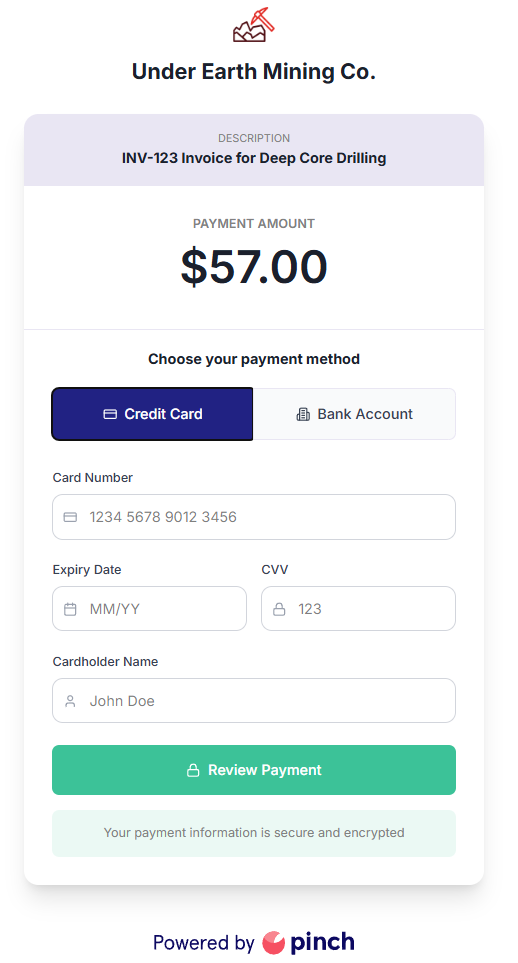
Example of a Payment Link page with both Credit Card and Bank Account payment options allowed.
Creating a Payment Link
Use the Pinch API to create a Payment Link for your payers, these links will take your payers to a Pinch-hosted payment page to save you having to build payments
See the Create Payment Link Endpoint API Reference for the detailed reference.
Using Payment Links
1. Generate the link
Call the POST /payment-links endpoint with the required fields.
2. Share the link
Send the returned url to your customer via:
- SMS
- Chat
- CRM automations
- Workflow builder tools (Zapier, n8n, Make, etc.)
3. Customer completes payment
The customer is taken to a secure Pinch‑hosted checkout page and redirected back using the url provided by the returnUrl parameter during creation. This redirect will include querystring parameters for both the paymentLinkId and the paymentId.
Do not use the redirect as the authoritative signal that a payment succeeded. The customer's browser can be closed or interrupted before the redirect fires, and the redirect itself does not confirm payment outcome. Always use webhooks to determine the final payment status.
4. Track the payment
Use webhooks as the reliable source of truth for payment outcomes. Subscribe to the following event types and filter by paymentId:
| Event | Meaning |
|---|---|
scheduled-process | The payment has been submitted for processing |
bank-results | The payment result has come back from the bank (bank account payments only) |
transfer | The payment has been settled to your account |
See the Events Guide for full event payloads.
5. Handle incomplete payments
Customers may close the browser before completing payment, or abandon the checkout page. In these cases:
- No
paymentIdwill be returned in the redirect (or the redirect won't fire at all). - No payment event will arrive via webhook.
- The Payment Link remains active until it expires (or you delete it).
Design your return URL handler to cope gracefully with a missing paymentId. For example, show a "payment not completed" message and offer the same link again.
Testing
Use the Create Payment Link Endpoint in test mode to generate a Payment Link in test mode which can be used with any of the available test credit cards, see Test and Live Mode for more details.
Got feedback on this feature?
Send an email to [email protected] or book in a chat with our API team.
Updated 3 months ago